Dyness battery storage installation: tips & tricks
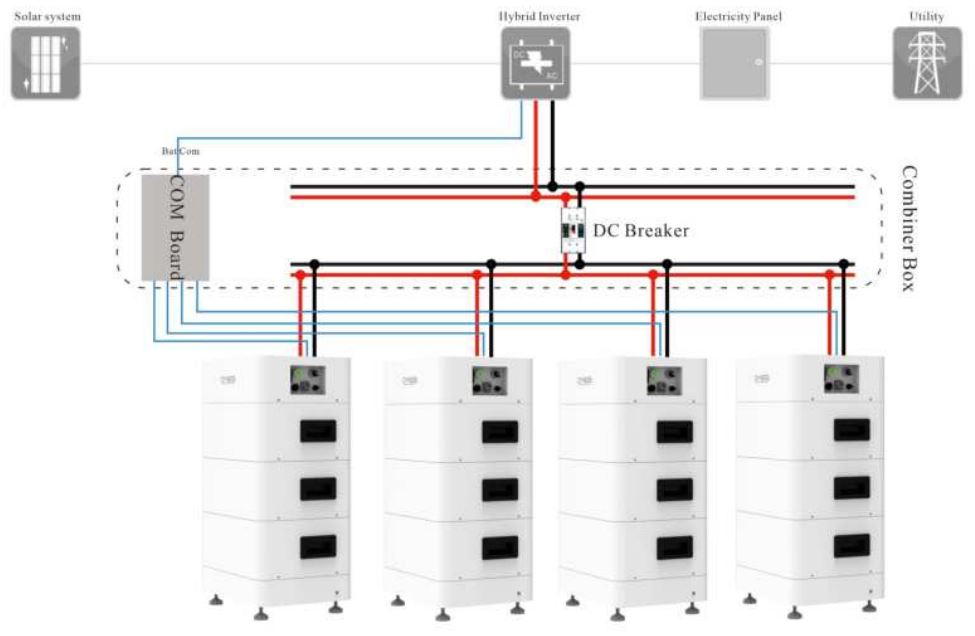
For installing your storage system, you can find all necessary manuals in the download section on the storage product page. Please also follow the instructions for connecting to the respective inverters. You can find manufacturer installation videos here.
Which Dyness storage sizes are compatible with which inverters:
| Kostal PLENTICORE plus / BI inverter – G2 3.0–10 kW |
Dyness Tower 2.0 T7 – T21 |
Wiring guide here |
| Kostal PLENTICORE hybrid inverter – G3 4.0–20 kW |
Dyness Tower 2.0 T7 – T21 |
Wiring guide here |
| Solis S6-EH3P(5-10)K-H-EU |
Dyness Tower 2.0 T7 – T17 (T21 does not work!) |
Wiring guide here |
| GoodWe GWxxKN-ET PLUS+ Series |
Dyness Tower 2.0 T10 – T17 (T7 and T21 do not work!) |
Wiring guide here |
Tip for the latest firmware and even more safety! The BDU controller is equipped with a WiFi module that enables remote access to the battery via WiFi to view key battery parameters—state of charge, capacity, total pack voltage, temperature, current discharge current, and other values relevant for remote diagnostics. Remote access is available via a mobile app (Android, iOS) or via a web browser on a computer. With WiFi access, the BDU can also be updated remotely to the latest firmware version, which improves communication stability between the battery and the inverter and helps prevent the inverter from disconnecting from the battery when the SOC drops below the threshold value. In addition, the storage system is checked for possible issues, providing extra safety.
IMPORTANT! To receive the full 10-year manufacturer warranty for your Dyness storage system, you must register the storage system directly with Dyness here.